
Transformez#
Global vertical datum transformations, simplified
Transformez builds and applies vertical transformations across geodetic, tidal, and model-based height references, from local datums to global surfaces.
Transformez resolves your input and output references, computes the optimal geodetic pathway on the fly, and generates spatially varying shift grids. Where regional models end, Transformez continues across open ocean and inland using global proxies, coastal blending, and meter-based inland decay.
Transformez is part of the Continuous DEMs Project, an ecosystem of tools for modern, continuous digital elevation model generation.
Key Features#
Dynamic Hub-and-Spoke routing — Automatically selects the optimal geodetic pathway (NAD83 or WGS84) for your transformation
Continuous coastal blending — Seamlessly merges NOAA VDatum with global ocean models, including the DTU25 altimetry-derived mean sea surface and FES2014 tide model.
Inland tidal decay — Smart extrapolation with Hermite S-curve smoothing for flood modeling
Global coverage — Provides global fallback coverage where regional models are unavailable.
CLI + Python API — Use as a command-line tool or embed in your pipeline
Offline field use — Pre-download grids with
transformez prefetchfor air-gapped environments
Quickstart#
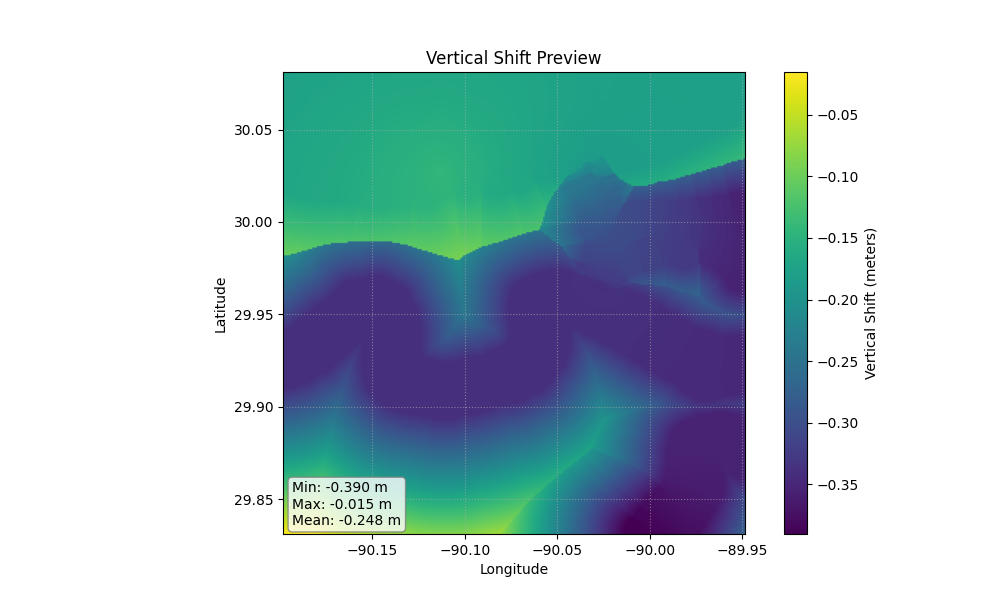 (Above: A generated vertical shift grid transforming MLLW to NAVD88)
transformez build -R loc:"new orleans" -E 3s -I vdatum:mllw -O epsg:5703
Installation:#
pip install transformez
Note: To enable matplotlib previews, install with the preview extra:
pip install transformez[preview]
Command Line Interface:#
Build a vertical shift grid anywhere on Earth.
transformez build -R -166/-164/63/64 -E 1s -I vdatum:mllw -O epsg:4979
Transform a raster directly. Transformez reads the bounds/resolution from the file.
transformez shift my_dem.tif -I vdatum:mllw -O epsg:5703
Python API#
Transformez provides a high-level API for embedding transformations directly into your Python scripts, Jupyter Notebooks, or automated pipelines.
import transformez

# Generate a Shift Grid
# Returns a 2D numpy array. Optionally saves to a file.
# Requesting "mllw" in India triggers the Global Fallback automatically.
shift_array = transformez.generate_grid(
    region=[80, 85, 10, 15],  # [West, East, South, North]
    increment="3s",           # Grid resolution
    datum_in="vdatum:mllw",   # Vdatums mllw realization.
    datum_out="epsg:4979",    # WGS84 Ellipsoid
    out_fn="india_shift.tif"  # Optional: Save to disk
)


# Use generation.build_shift_grid to access the ShiftGrid object directly
from transformez.grid.shift import build_shift_grid

shift = build_shift_grid(
    region=[-124.1, -124.0, 44.5, 44.6],
    increment="3s",
    datum_in="vdatum:mllw",
    datum_out="EPSG:5703",
)

print(shift.crs)
print(shift.source_reference)
print(shift.target_reference)

shift.write("mllw_to_navd88.tif")

utm_shift = shift.reproject("EPSG:32610")
utm_shift.write("mllw_to_navd88_utm.tif")


# Transform an Existing Raster
# Applies the datum shift directly to a DEM and saves the result.
out_file = transformez.transform_raster(
    input_raster="my_dem_mllw.tif",
    datum_in="vdatum:mllw",
    datum_out="epsg:5703",
    output_raster="my_dem_navd88.tif"
)
Learn More#
Read the User Guide to install Transformez, generate your first shift grid, and understand how it works; from reference inputs and the CLI/Python API through the geodetic methodology behind the dynamic hub-and-spoke routing, sign conventions, and coastal blending.